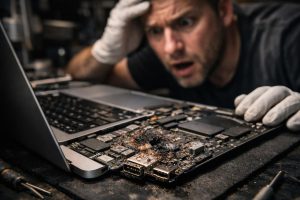
Contact with liquids is one of the most frequent causes of serious MacBook failure, and also one of the most feared, especially when the equipment holds important data without a backup. The good news is that, in most cases, specialised electronic repair can save both the equipment and the data. The secret lies in acting quickly and turning to technicians experienced in microsoldering and Apple logic board diagnostics.
In this article we explain how the repair process works for a MacBook with liquid damage, what happens when the power circuits are affected, and how it is possible to recover access to data even when the screen or keyboard are damaged. If your MacBook has suffered a liquid accident, this guide is for you.
What Happens Internally When a MacBook Comes into Contact with Liquid
When liquid penetrates the inside of a MacBook, the damage is neither immediate nor uniform. The liquid travels through the electronic components of the logic board, creating conductive bridges between circuits that should not be connected. This causes short circuits that can burn electronic components, such as integrated circuits, resistors, capacitors and, in more serious cases, the power circuit itself.
- Damaged power circuit: the MacBook does not start because power does not reach the essential components.
- Burnt components: melted chips and integrated circuits prevent the system from working normally.
- Residual short circuits: even after drying, corrosion continues to damage the board if left untreated.
- Affected peripherals: the keyboard and screen are frequently damaged by the path of the liquid, regardless of the logic board.
It is important to understand that the fact the MacBook does not turn on does not mean the data is lost. The internal SSD may be completely intact, waiting to be accessed as soon as the power circuit is restored.
Electronic Repair: Replacement of Integrated Circuits and Burnt Components
Repairing a MacBook with liquid damage on the logic board is a process that requires specialised equipment and advanced training in electronics. It is not a matter of swapping one part for another, but rather of diagnosing at component level, identifying exactly what failed, and repairing or replacing those elements with precision.
The typical process includes the following steps:
- Complete electrical diagnosis: using a multimeter, oscilloscope and electrical schematics to identify the damaged components.
- Ultrasonic cleaning: removal of residue and corrosion from the logic board before any repair.
- Microsoldering: replacement of integrated circuits, MOSFETs, capacitors and other burnt components using a hot air station and microscope.
- Power circuit testing: verifying that power flows correctly through all subsystems before turning on the equipment.
- Startup validation: confirming that the MacBook starts up, reaches the login screen and responds normally to the operating system.
When the repair is successful, the MacBook resumes normal operation from a system standpoint. However, other physical components, such as the keyboard or screen, may have been damaged by the path of the liquid and require separate replacement.
Accessing Data When the Screen or Keyboard Are Damaged
A common situation after liquid damage repair is the MacBook turning on and starting up normally, but with the screen or keyboard compromised. In this scenario, there is an elegant, native macOS solution that many users are unaware of: Screen Sharing.
If the MacBook is connected to the same local network as another Mac, it is possible to remotely access the damaged equipment from an iMac or another MacBook. To do this:
- Make sure Screen Sharing is enabled in the System Preferences of the damaged Mac (it may need to be enabled beforehand, before the incident).
- On the Mac that is in good condition, open Finder and locate the damaged Mac in the network section.
- Click Share Screen and enter the user account credentials.
- From this point on, you can control the damaged Mac as if you were directly in front of it, transfer files and back up the data.
This approach is particularly useful when the main goal is data recovery and the user already has another Mac available on the same home or office network. It allows the decision about screen or keyboard repair to be postponed without losing immediate access to the files.
Precautions and Best Practices After a Liquid Accident
If your MacBook has come into contact with liquid, what you do in the first few hours is decisive for the success of the repair. Follow these recommendations:
- Turn off the equipment immediately and do not try to turn it on again, as this can worsen the short circuits.
- Do not use a hair dryer or put the Mac in rice, as these practices are ineffective and can cause additional damage.
- Take the equipment to a specialised technician as soon as possible. Corrosion begins to develop within a few hours and worsens the damage the longer it is left.
- Inform the technician about the type of liquid (water, coffee, juice), as liquids with sugar or acidity cause more aggressive corrosion.
- Do not try to open the MacBook without suitable tools, as the internal screws and connectors are fragile and easily damaged.
Speed in technical intervention is often the difference between a successful repair and an unrecoverable piece of equipment. With the right resources and an accurate diagnosis, even MacBooks with severe liquid damage can be restored to working order, ensuring access to the data that matters most.
Frequently Asked Questions
My MacBook came into contact with liquid and won’t turn on. Is it still possible to recover the data?
In most cases, yes. Even when the MacBook does not start due to liquid damage, the data stored on the SSD may be intact. The first step is to take the equipment to a technician specialised in Apple electronic repair, who will diagnose which components were affected. If the power circuit can be repaired, the MacBook can turn on again and the data becomes accessible. In cases where the logic board is unrecoverable, there are advanced techniques for recovering data directly from the memory chip.
The MacBook turns on but the screen or keyboard are damaged after contact with liquid. Can I access my files?
Yes. Even with the screen or keyboard damaged, it is possible to access the Mac via screen sharing on the local network, using another Mac or iMac connected to the same network. macOS natively includes the Screen Sharing feature, which allows you to control the damaged computer from another device. This solution is particularly useful when the equipment manages to turn on and reach the login screen, even if the peripheral hardware is compromised.
How long does it take to repair a MacBook with liquid damage on the logic board?
The repair time depends on the extent of the electronic damage. The average diagnostic time is 3 days. Replacing burnt integrated circuits and electronic components can take between 3 to 7 working days, depending on component availability and the complexity of the damage. In cases with multiple affected components or short circuits, the timeframe may be longer. It is always recommended to hand in the equipment as soon as possible after the incident, as corrosion worsens over time.
Need help? Contact MEGABIT at comercial@megabit.ptin-person support in Baixa do Porto and the entire Northern Portugal region.
Want to be notified when we publish our next article or video?
Free. Get notified as soon as we publish. No spam, easy to unsubscribe.