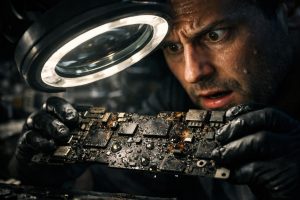
Contact with liquids is one of the most feared scenarios for any MacBook user. In a second, a spilled glass of water or equipment exposed to rain can result in a computer that simply won’t turn on, leaving work data, projects and digital memories seemingly inaccessible. The good news is that, even in the most serious situations, there are technical paths that allow you to recover the equipment, the data, or both.
This guide clearly explains what happens internally when a MacBook suffers liquid damage, what procedures a specialised technician can perform, and what you should do, or avoid, in the first hours after the incident. If your MacBook won’t turn on after contact with water, this article is the right starting point.
What Happens Internally When a MacBook Comes into Contact with Liquids
Contrary to what many people imagine, water damage to a MacBook is rarely immediate and total. In most cases, the liquid progressively infiltrates the internal components and causes corrosion in the integrated circuits, connectors and power boards. This process can take hours or even days to fully manifest, which explains why some equipment continues to work briefly after the incident before stopping definitively.
The most vulnerable components include the main power circuit, the battery charging controller, the display power circuit and the power management chips. When one or more of these elements are affected, the MacBook may display various symptoms: not turning on at all, turning on without a display image, starting intermittently, or entering continuous restart cycles. Each of these symptoms provides the technician with valuable information about the origin and extent of the damage.
Diagnosis and Repair: What to Expect from a Specialised Intervention
When a MacBook with liquid damage reaches a specialised technician, the first step is always diagnosis at the level of the electronic components. This process involves opening the equipment, cleaning corrosion residues with suitable products, and analysing the voltages and currents in each section of the motherboard with measurement equipment.
Depending on the diagnostic results, the intervention may include:
- Replacement of damaged integrated circuits, such as power controllers or display management chips;
- Repair of the power circuit through component-level microsoldering, a technique that requires specialised training and professional equipment;
- Replacement of capacitors, resistors or other passive components affected by corrosion;
- Data recovery, when the main objective is to preserve the stored information, even if the equipment does not regain full functionality.
It’s important to understand that, even after a successful repair, it’s not possible to offer a warranty on equipment with a history of contact with liquids. Corrosion can continue to affect components that appeared to be intact at the time of the intervention, making any warranty technically impossible to guarantee.
When the Screen Doesn’t Work: The External Monitor Solution
A common scenario in MacBooks repaired after water damage is the equipment turning back on, but the internal screen remaining without an image. This happens when the display power circuit is irreversibly damaged, even if the motherboard and internal storage are operational.
In these cases, there is a practical and immediate solution: connect the MacBook to an external monitor via one of the Thunderbolt/USB-C ports. Modern MacBooks, including models with the Apple Silicon chip, support video output to external monitors even when the internal screen doesn’t work. This approach allows you to:
- Access all files and data stored on the internal SSD;
- Continue using the equipment normally for work;
- Make a complete backup to an external disk before deciding the next step;
- Calmly assess whether it’s worth repairing the screen or investing in new equipment.
To connect a MacBook to an external monitor, you need a cable or adapter compatible with USB-C to HDMI, DisplayPort or another video standard supported by the available monitor. Most specialised technicians can advise on the most suitable adapter for each situation.
What to Do in the First Hours After the Incident
How quickly you act after contact with liquids is decisive for the final outcome. Follow these steps to maximise the chances of recovering the equipment and the data:
- Turn off the MacBook immediately and, if possible, remove the power source;
- Do not try to turn on the equipment to check if it still works, this is the most common mistake and can irreversibly worsen the damage;
- Place the MacBook with the bottom facing up, in an inverted V position, to facilitate liquid drainage;
- Do not use a hair dryer or other direct heat sources, heat can accelerate corrosion and damage additional components;
- Take the equipment to a specialised technician as quickly as possible, ideally within the first 24 hours after the incident.
In companies where the MacBook is a critical work tool, it’s equally advisable to have a regular backup policy, either through Time Machine to an external disk or through cloud backup solutions. This precaution ensures that, even in the worst-case scenario, data loss is minimal or non-existent.
Frequently Asked Questions
My MacBook has come into contact with water and won’t turn on. Is it still possible to recover the data?
In most cases, yes. Even when the electronic components are damaged to the point of preventing the MacBook from starting normally, the data stored on the SSD can remain intact. A specialised technician can diagnose the state of the circuits, try to reactivate the equipment or, alternatively, access the internal storage through data recovery methods. The faster you take the equipment to a technician after the incident, the greater the chances of success.
What does ‘damaged display power circuit’ mean and how does it affect the use of the MacBook?
The display power circuit is responsible for supplying power to the MacBook’s internal screen. When this circuit is damaged, for example due to corrosion caused by liquids, the screen may stop working even if the rest of the equipment is operational. In these cases, it’s possible to continue using the MacBook by connecting it to an external monitor via HDMI or USB-C, which allows access to the data and normal work while deciding the next step, whether repairing the screen or replacing the equipment.
Why isn’t there a warranty on a MacBook repair after water damage?
Damage caused by liquids is considered accidental damage and is excluded from the Apple warranty and most repair warranties. In addition, corrosion caused by water can continue to progress silently in the internal circuits even after the initial repair, making it impossible to guarantee the long-term stability of the equipment. For this reason, specialised technicians always inform the customer of this limitation before proceeding with any intervention on equipment with a history of contact with liquids.
Need help? Contact MEGABIT at comercial@megabit.ptin-person support in Baixa do Porto and the entire Northern Portugal region.
Want to be notified when we publish our next article or video?
Free. Get notified as soon as we publish. No spam, easy to unsubscribe.